
Are you still managing your VMs on Proxmox? If you’re looking to advance your cloud computing studies and get closer to real enterprise environments, it might be time to rethink your virtualization stack. In this post, I’ll share the reasons that led me to migrate my homelab from Proxmox and OpenStack to Apache CloudStack, and how this decision transformed my learning experience.
Why Not Proxmox?
Don’t get me wrong - Proxmox is an excellent virtualization platform. It’s free, has an intuitive web interface, manages both LXC containers and KVM VMs, and works great for most homelabs. Many IT professionals successfully use Proxmox in their labs.
Proxmox Limitations for Advanced Studies
However, when you start diving deeper into cloud computing and infrastructure as code (IaC) concepts, some limitations appear:
Limited API for advanced automation - Although Proxmox has an API, it’s mainly focused on basic CRUD operations (create, read, update, delete) on VMs and containers.
Not a real cloud platform - Proxmox is a hypervisor with a web interface, not a cloud orchestration platform. Concepts like multi-tenancy, service offerings, and network orchestration are not native.
Distance from the enterprise world - Very few companies use Proxmox in production. If your goal is to learn technologies relevant to the market, you need something closer to what’s used in real datacenters.
Limited Terraform automation - Although there’s a Terraform provider for Proxmox, the experience doesn’t compare to public cloud providers or enterprise IaaS platforms.
If you just want to run some VMs and services at home, Proxmox is perfect. But if you want to simulate a real cloud environment and learn enterprise technologies, you need something more robust.
What About OpenStack? Why Not?
After Proxmox, many enthusiasts consider OpenStack as the natural next step. After all, it’s the most popular open-source private cloud platform, used by large companies and cloud providers.
The Problem: OpenStack Can Be “Overkill”
OpenStack is fantastic, but comes with its own complications:
Extreme complexity - OpenStack is composed of over 30 different projects (Nova, Neutron, Cinder, Glance, Keystone, etc.). Each has its own configurations and quirks.
Hardware requirements - To run OpenStack properly, you need significant resources. A minimal deployment already consumes a lot of RAM and CPU.
Steep learning curve - Before you can start using OpenStack as a study platform, you need to invest weeks (or months) just to understand how to install and configure it correctly.
Laborious maintenance - Upgrades, troubleshooting, and OpenStack maintenance can consume more time than you’d really like to spend on a homelab.
More niche market - Although OpenStack is used in production, its adoption is more concentrated in telecoms and large private clouds. For most professionals, it’s not the technology they’ll encounter day-to-day.
For me, OpenStack ended up being more weight than benefit. I wanted to study cloud concepts and automation, not spend weeks debugging Neutron.
The Decision: Apache CloudStack
After evaluating the options, I decided to migrate to Apache CloudStack. And this choice completely changed my homelab experience.
Why CloudStack?
CloudStack offers the best of both worlds:
1. Real Cloud Platform
Unlike Proxmox, CloudStack is a complete IaaS cloud orchestration platform, with:
- Native multi-tenancy - Support for multiple users, domains, and accounts
- Service Offerings - Resource templates (CPU, RAM, disk) like in public clouds
- Network Orchestration - VLANs, VPCs, Load Balancers, VPNs, all managed by the platform
- Storage Management - Primary and Secondary Storage, templates, snapshots, volumes
- Autoscaling and High Availability - Native enterprise features
2. Simpler Than OpenStack
CloudStack has a much leaner architecture:
- Single application (Management Server) instead of dozens of separate services
- Straightforward installation and configuration - In a few hours you have a working environment
- Simpler maintenance - Fewer components = fewer failure points
- Cohesive documentation - Everything in one place, not fragmented across 30 different projects
3. Market Relevance
CloudStack is used in production by various cloud providers around the world:
- Cloud providers - Like Leaseweb, ShapeBlue, and others in Europe, Asia, and Latin America
- Telecommunications companies - Several telecoms use CloudStack for their cloud services
- Companies needing private cloud - Especially in regulated sectors that can’t use public cloud
Knowing CloudStack can open doors in companies operating private or hybrid cloud infrastructure.
4. Excellent for Automation and IaC
CloudStack has an extremely complete and well-documented API, and the Terraform provider for CloudStack is mature and well-maintained. This means I can:
- Provision all my infrastructure as code
- Create and destroy complete environments with one command
- Simulate real cloud-native application deployment scenarios
- Practice GitOps and CI/CD for infrastructure
My Current Topology
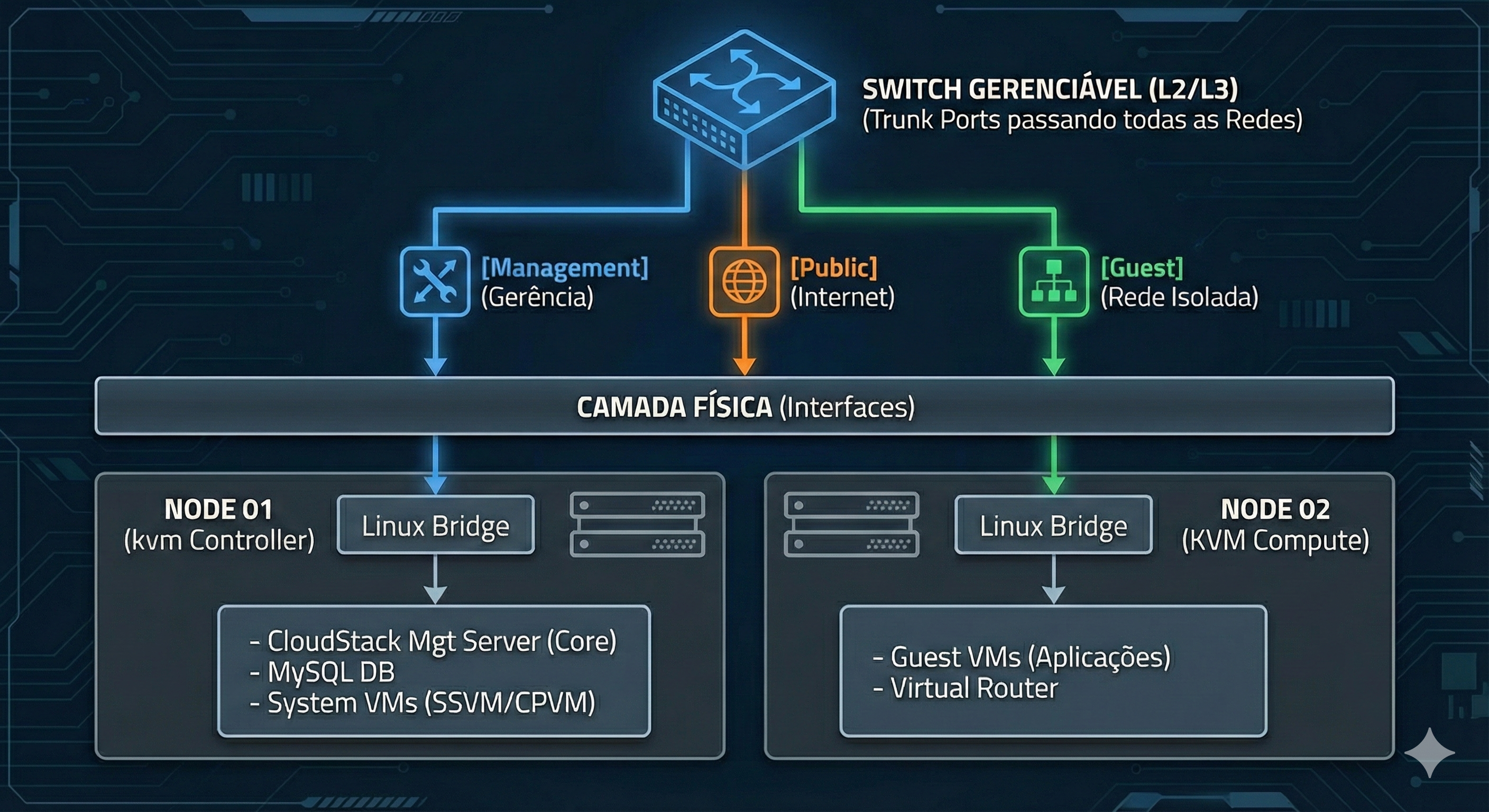
Here’s how I structured my homelab with CloudStack:
Physical Infrastructure
Components
Management Server
- Dedicated VM/machine running CloudStack Management Server
- Responsible for all orchestration, API, and web interface
- MySQL/MariaDB for database
- NFS for Secondary Storage (templates, snapshots, ISOs)
KVM Hosts (2 nodes)
- Physical servers or powerful VMs running KVM
- Connected via libvirt to the Management Server
- Local or shared Primary Storage (NFS/iSCSI)
- Each host on a separate management VLAN
Managed Switch
- VLAN support (essential for network segregation)
- Management VLAN (CloudStack ↔ Hosts communication)
- Guest VLANs (networks for created VMs)
- Public VLAN (external/internet access)
- Storage VLAN (NFS/iSCSI traffic, if applicable)
Why This Topology?
This configuration simulates a real datacenter at reduced scale:
- Separation of concerns - Management separate from Compute
- High availability - Two hosts allow VM migration tests, redundancy, etc.
- Enterprise networking - VLANs segregating different types of traffic
- Scalability - Easy to add more KVM hosts as needed
Unlike Proxmox where you’d have VMs managed individually on each node, with CloudStack you have a centralized orchestration layer that manages all resources as a unified pool - exactly like AWS, Azure, or GCP do.
Benefits I’ve Experienced
Since migrating to CloudStack, I’ve enjoyed several benefits:
1. Learning Enterprise Concepts
- Zones, Pods, Clusters - Real datacenter hierarchy
- Service Offerings - How to create VM “plans” (like AWS t2.micro, t2.large)
- Network Offerings - Different network topologies (isolated, VPC, shared)
- Accounts and Domains - Real multi-tenancy
2. Advanced Automation with Terraform
I can provision complete infrastructure via code:
resource "cloudstack_instance" "web_server" {
  name             = "web-server-01"
  service_offering = "Medium Instance"
  template         = "Ubuntu 22.04"
  zone             = "lab-zone-1"
  network_id       = cloudstack_network.app_network.id
}

resource "cloudstack_network" "app_network" {
  name             = "app-tier-network"
  cidr             = "10.1.1.0/24"
  network_offering = "DefaultIsolatedNetworkOffering"
  zone             = "lab-zone-1"
}This allows me to practice Infrastructure as Code for real, with a platform that behaves like public clouds.
3. Testing Environment for Certifications
If you’re studying for cloud certifications (AWS, Azure, GCP), having a local CloudStack helps understand fundamental IaaS concepts:
- VPCs and isolated networks
- Security Groups
- Load Balancers
- Storage (Block Storage, Object Storage)
- Templates and Images
4. Real API Experience
CloudStack’s API is REST, well-documented, and extremely complete. This means I can:
- Integrate with Python/Go/Bash scripts
- Create custom tools
- Simulate automation scenarios I’d find in real companies
Challenges and How I Overcame Them
Of course, it’s not all roses. Here are some challenges I faced:
1. Initial Learning Curve
Challenge: Understanding CloudStack’s architecture (Zone → Pod → Cluster → Host) takes time.
Solution: The official documentation is excellent. I spent a few days reading and testing on VMs before building the final environment.
2. Network Requirements
Challenge: CloudStack requires a managed switch with VLAN support.
Solution: Not mandatory, but recommended, as it can be configured without a managed switch. I invested in a basic managed switch (TP-Link TL-SG105E or similar). It doesn’t need to be enterprise-grade, just support 802.1Q VLANs.
3. Storage
Challenge: Configuring NFS for Secondary Storage can be confusing at first.
Solution: I used the Management Server itself as an NFS server to start. Later, I’ll migrate to a dedicated NAS as I scale or maybe not even use it.
4. Debugging
Challenge: When something goes wrong, logs can be extensive.
Solution: I learned to use CloudMonkey (CloudStack CLI) and read logs at /var/log/cloudstack/management/. Over time, it became easier to identify problems.
Next Steps
Now that I have a working CloudStack environment, my next steps are:
- Automated the entire deployment with Ansible - Provision CloudStack installation
- Automated the entire deployment with Terraform - Provision base infrastructure as code, with Kubernetes
- Implement CI/CD - Complete infra + application pipeline
And of course, in the next video I’ll bring a step-by-step tutorial on how you can set up CloudStack locally in your own homelab using Ansible!
Conclusion: Is It Worth Migrating?
Migrating from Proxmox to CloudStack was one of the best decisions I made for my homelab. If you:
- ✅ Want to learn real cloud computing concepts
- ✅ Seek a platform relevant to the enterprise market
- ✅ Like automation and Infrastructure as Code
- ✅ Want to simulate a real datacenter at home
- ✅ Don’t want OpenStack’s absurd complexity
Then Apache CloudStack might be the perfect choice for you.
Quick Comparison
| Criteria | Proxmox | OpenStack | CloudStack |
|---|---|---|---|
| Ease of installation | ⭐⭐⭐⭐⭐ | ⭐⭐ | ⭐⭐⭐⭐ |
| IaaS cloud features | ⭐⭐ | ⭐⭐⭐⭐⭐ | ⭐⭐⭐⭐⭐ |
| Complexity | ⭐ | ⭐⭐⭐⭐⭐ | ⭐⭐⭐ |
| API quality | ⭐⭐⭐ | ⭐⭐⭐⭐ | ⭐⭐⭐⭐⭐ |
| Terraform support | ⭐⭐⭐ | ⭐⭐⭐⭐ | ⭐⭐⭐⭐⭐ |
| Market relevance | ⭐⭐ | ⭐⭐⭐⭐ | ⭐⭐⭐⭐ |
| Hardware requirements | ⭐⭐⭐⭐ | ⭐⭐ | ⭐⭐⭐⭐ |
| Documentation | ⭐⭐⭐⭐ | ⭐⭐⭐ | ⭐⭐⭐⭐⭐ |
Who Is Each Platform For?
- Proxmox: Ideal for those who want a simple and efficient hypervisor to run VMs and containers without complications
- OpenStack: For those who want to study the specific platform (work with OpenStack or plan to) and have robust hardware
- CloudStack: For those who want to learn enterprise cloud computing, automation, and IaC without OpenStack’s complexity
Useful Resources and Links
- Apache CloudStack Official Documentation
- CloudStack GitHub
- Terraform Provider for CloudStack
- CloudMonkey CLI
- CloudStack Community
Stay tuned for the next post/video where I’ll show the complete step-by-step CloudStack installation tutorial!
Have you used CloudStack? Have questions about the migration? Leave them in the comments!
Comments