Is NGINX Ingress Controller Dead? Meet NGINX Gateway Fabric
If you work with Kubernetes, you’ve probably used or at least heard of the NGINX Ingress Controller. For a long time, it was the default choice for exposing applications to the outside world. But recently, F5 (owner of NGINX) announced the deprecation of the project.
Don’t panic! NGINX isn’t dead — it evolved. In this post, I’ll show you what NGINX Gateway Fabric is, how the Gateway API works, and why this change is actually a major evolution for anyone working with Kubernetes.
What Happened to NGINX Ingress Controller?
The NGINX Ingress Controller has been deprecated in favor of a new implementation: NGINX Gateway Fabric. But why this change?
The Problem with Traditional Ingress
The Kubernetes Ingress model, while functional, has always had some limitations:
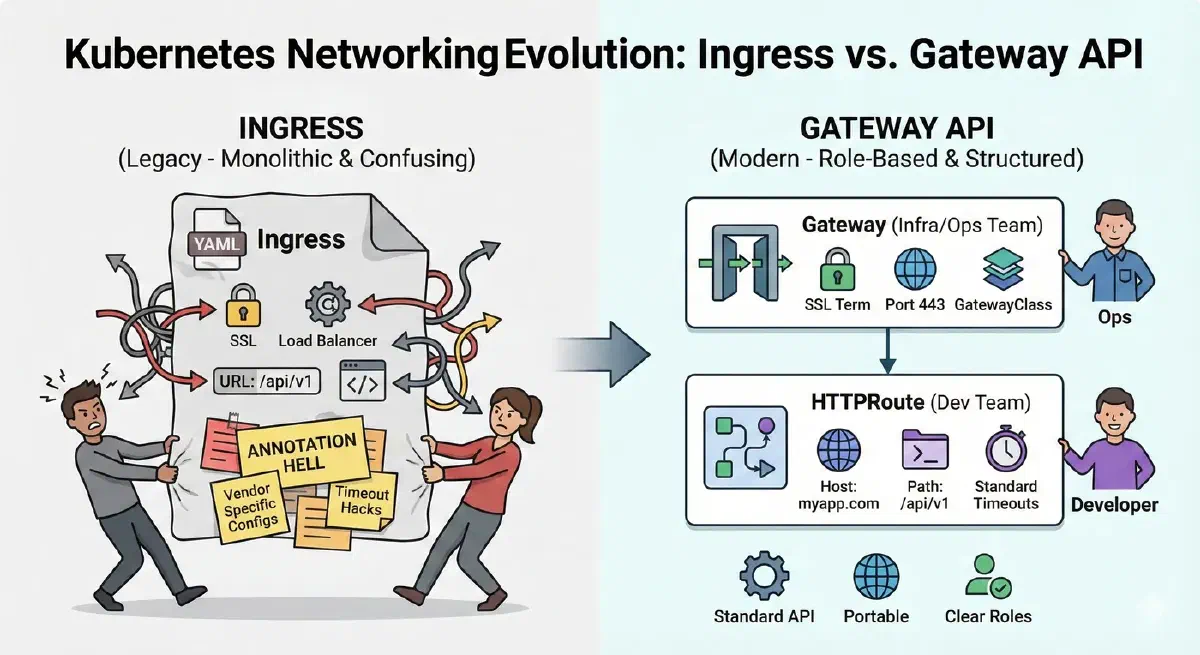
- Everything in a single resource — Ingress mixes infrastructure configurations with application configurations
- Annotation Hell — Advanced features like SSL redirect, timeouts, and rate limiting depend on controller-specific annotations
- Not portable — An Ingress configured for NGINX doesn’t work the same on Traefik or HAProxy
- Difficult separation of responsibilities — Who configures the Ingress? The infrastructure team or the developers?
Here’s a classic Ingress example that illustrates these problems:
apiVersion: networking.k8s.io/v1
kind: Ingress
metadata:
  name: my-confusing-ingress
  annotations:
    # --- THIS IS INFRASTRUCTURE (Annotation Hell) ---
    kubernetes.io/ingress.class: "nginx"
    nginx.ingress.kubernetes.io/ssl-redirect: "true"
    nginx.ingress.kubernetes.io/proxy-connect-timeout: "30"
    nginx.ingress.kubernetes.io/proxy-read-timeout: "120"
    aws-load-balancer-backend-protocol: "http"
    aws-load-balancer-ssl-ports: "443"
    cert-manager.io/cluster-issuer: "letsencrypt-prod"
    # -----------------------------------------------
spec:
  rules:
  # --- THIS IS DEVELOPER'S RESPONSIBILITY ---
  - host: mystore.com
    http:
      paths:
      - path: /api/v1/payments
        pathType: Prefix
        backend:
          service:
            name: payments-service
            port:
              number: 8080
  # ------------------------------------------------
See the problem? Infrastructure and application configurations are mixed in the same file. Who should manage this YAML? The SRE who understands SSL and timeouts, or the developer who knows their application?
The Solution: Gateway API
The Gateway API is the natural evolution of Ingress. It’s an official Kubernetes specification (sig-network) that solves these problems through a clear separation of responsibilities.
The Gateway API Architecture
The Gateway API divides configurations into three layers:
| Resource | Responsible | What it configures |
|---|---|---|
| GatewayClass | Provider (NGINX, Traefik, etc) | Controller implementation |
| Gateway | Infrastructure/Platform Team | Listeners, ports, TLS, IP |
| HTTPRoute | Development Team | Routes, hosts, paths, backends |
This separation allows:
- ✅ Infra manages the Gateway (certificates, public IPs, security policies)
- ✅ Devs manage only their routes (without touching infra configs)
- ✅ Everyone in their own lane, no conflicts
Installing NGINX Gateway Fabric
Before we start with the practical examples, we need to install NGINX Gateway Fabric in the cluster. The installation is done in two steps:
1. Installing the Gateway API CRDs
First, we need to teach Kubernetes what a Gateway, HTTPRoute, and other Gateway API resources are. We do this by installing the CRDs (Custom Resource Definitions):
kubectl kustomize "https://github.com/nginx/nginx-gateway-fabric/config/crd/gateway-api/standard?ref=v2.2.1" | kubectl apply -f -This command downloads and applies the CRDs directly from the official NGINX Gateway Fabric repository. With this, the cluster now understands the new resource types.
2. Installing NGINX Gateway Fabric
Now we install the controller itself. You can do this via Helm:
# Add the repo
helm repo add nginx-gateway https://nginx.github.io/nginx-gateway-fabric

# Install
helm install ngf nginx-gateway/nginx-gateway-fabric \
  --namespace nginx-gateway \
  --create-namespace
Or via manifests:
kubectl apply -f https://github.com/nginxinc/nginx-gateway-fabric/releases/latest/download/nginx-gateway.yamlAfter installation, verify that the controller is running:
kubectl get pods -n nginx-gatewayNow we’re ready to create our Gateways and Routes!
Understanding the LoadBalancer: Gateway vs Ingress
An important difference you’ll notice: when you apply a Gateway, it automatically creates a LoadBalancer with a dedicated IP.
| Aspect | Ingress Controller | Gateway API |
|---|---|---|
| LoadBalancer | One for the entire cluster | One per Gateway (can have multiple) |
| IP | Shared among all apps | Dedicated per Gateway |
| Isolation | All apps on the same entry point | Each Gateway can have its own IP |
In practice, on cloud providers:
- AWS: The Gateway creates a Network Load Balancer (NLB) or Application Load Balancer (ALB) for each Gateway
- GCP: Creates a dedicated Google Cloud Load Balancer
- Azure: Creates an Azure Load Balancer for each Gateway
- Apache CloudStack: In my homelab, CloudStack provisions a dedicated public IP for each Gateway automatically
- On-premise/Bare-metal: You can use MetalLB to assign IPs to Gateways
This means you can have:
- One Gateway for public applications (with external IP)
- Another Gateway for internal APIs (with private IP)
- One Gateway per customer/tenant in multi-tenant scenarios
With traditional Ingress, everything goes through the same IP — with Gateway API, you have total flexibility.
Practical Example: Migrating from Ingress to Gateway API
Let’s see in practice how it becomes simpler and more organized with the Gateway API.
1. Gateway (Managed by Infrastructure Team)
The Gateway defines the cluster’s “entry point”. This is where the platform team configures ports, protocols, and which namespaces can create routes:
apiVersion: gateway.networking.k8s.io/v1
kind: Gateway
metadata:
  name: main-gateway
  namespace: default
spec:
  gatewayClassName: nginx
  listeners:
  - name: http
    protocol: HTTP
    port: 80
    allowedRoutes:
      namespaces:
        from: All
Note the allowedRoutes.namespaces.from: All — this allows any namespace to create routes pointing to this Gateway. You can also restrict to specific namespaces, giving granular control over who can expose services.
2. HTTPRoute (Managed by Development Team)
The developer only needs to worry about their route and their service:
apiVersion: gateway.networking.k8s.io/v1
kind: HTTPRoute
metadata:
  name: cafe-route
  namespace: default
spec:
  parentRefs:
  - name: main-gateway
  hostnames:
  - "cafe.homelab.com"
  rules:
  - matches:
    - path:
        type: PathPrefix
        value: /
    backendRefs:
    - name: cafe-svc
      port: 80
That’s it! No annotations, no SSL or timeout configurations. The dev simply declares: “I want cafe.homelab.com to point to my cafe-svc service”.
3. Complete Application
Completing the example, here’s the Deployment and Service:
# deployment.yml
apiVersion: apps/v1
kind: Deployment
metadata:
  name: cafe
  namespace: default
spec:
  replicas: 1
  selector:
    matchLabels:
      app: cafe
  template:
    metadata:
      labels:
        app: cafe
    spec:
      containers:
      - name: nginx
        image: nginxdemos/nginx-hello:plain-text
        ports:
        - containerPort: 8080
        resources:
          requests:
            cpu: 100m
            memory: 128Mi
          limits:
            cpu: 500m
            memory: 512Mi
---
# service.yml
apiVersion: v1
kind: Service
metadata:
  name: cafe-svc
  namespace: default
spec:
  ports:
  - port: 80
    targetPort: 8080
  selector:
    app: cafe
Multi-Tenancy: Multiple Applications, One Gateway
One of the great advantages of the Gateway API is native support for multi-tenancy. You can have a single Gateway serving multiple applications from different teams.
Example: Adding a Payments Service
Imagine another team wants to expose the payments API in the same cluster:
# deployment.yml
apiVersion: apps/v1
kind: Deployment
metadata:
  name: payments-svc
  namespace: default
spec:
  replicas: 1
  selector:
    matchLabels:
      app: payments-svc
  template:
    metadata:
      labels:
        app: payments-svc
    spec:
      containers:
      - name: nginx
        image: nginxdemos/nginx-hello:plain-text
        ports:
        - containerPort: 8080
        resources:
          requests:
            cpu: 100m
            memory: 128Mi
          limits:
            cpu: 500m
            memory: 512Mi
---
# service.yml
apiVersion: v1
kind: Service
metadata:
  name: payments-svc
  namespace: default
spec:
  ports:
  - port: 80
    targetPort: 8080
  selector:
    app: payments-svc
And the route:
apiVersion: gateway.networking.k8s.io/v1
kind: HTTPRoute
metadata:
  name: api-route
  namespace: default
spec:
  parentRefs:
  - name: main-gateway
  hostnames:
  - "api.homelab.com"  # Different domain!
  rules:
  - matches:
    - path:
        type: PathPrefix
        value: /
    backendRefs:
    - name: payments-svc  # Different service!
      port: 80
Done! Now we have:
cafe.homelab.com→ Cafe Serviceapi.homelab.com→ Payments Service
Each team manages only their own HTTPRoute, and the platform team manages the central Gateway. Zero conflicts, zero duplicate annotations.
Testing the Routes
To test, just make requests with the correct Host header:
# Getting the Gateway IP
export IP_VIP=$(kubectl get gateway main-gateway -o jsonpath='{.status.addresses[0].value}')

# Testing the Cafe service
curl -v -H "Host: cafe.homelab.com" http://$IP_VIP

# Testing the API/Payments service
curl -v -H "Host: api.homelab.com" http://$IP_VIP

# Testing an unconfigured host (should return 404)
curl -v -H "Host: wrong.com" http://$IP_VIP
Why Migrate to Gateway API?
✅ Clear Benefits
| Aspect | Ingress | Gateway API |
|---|---|---|
| Separation of responsibilities | ❌ All together | ✅ Gateway vs HTTPRoute |
| Portability | ❌ Specific annotations | ✅ Standardized API |
| Multi-tenancy | ❌ Complex | ✅ Native |
| Evolution/Extensibility | ❌ Limited | ✅ New resources (GRPCRoute, TCPRoute, etc) |
| Community support | ⚠️ Stable but stagnant | ✅ Actively developed |
NGINX Gateway Fabric
NGINX Gateway Fabric is F5/NGINX’s implementation of the Gateway API. It replaces the old Ingress Controller and brings:
- Complete Gateway API v1 implementation
- The NGINX performance you already know
- Support for HTTPRoute, GRPCRoute, and more
- Smooth transition for existing NGINX users
Conclusion
The NGINX Ingress Controller may have been deprecated, but NGINX is more alive than ever with Gateway Fabric. Migrating to the Gateway API isn’t just an update — it’s an architectural evolution that brings:
- 🎯 Clear separation between infra and dev
- 🔄 Portability between different controllers
- 🏢 Native and secure multi-tenancy
- 🚀 Guaranteed future with active Kubernetes community support
If you’re still using Ingress, now is the perfect time to start planning your migration. The Gateway API is here to stay, and the sooner you adopt it, the more prepared you’ll be for the future of Kubernetes.
Have questions about migration or want to see more examples? Leave a comment!
kubectl get related
| NAME | READY | STATUS | AGE |
|---|---|---|---|
 nginx-vs-traefik-vs-caddy Nginx vs Traefik vs Caddy: Which Reverse Proxy to Choose? | 1/1 | Available | 331d |
 kubevirt-on-apple-silicon-kubesilicon KubeVirt does not run on Apple Silicon, so I built KubeSilicon | 1/1 | Available | <1d |
 leaving-proxmox-kubernetes-native-private-cloud I created VirtFoundry: a Kubernetes operator on a path to CNCF Sandbox | 1/1 | Available | 49d |
kubectl get events