MASTER Reusable Workflows and Say GOODBYE to Copy-Paste in Your CI/CD!
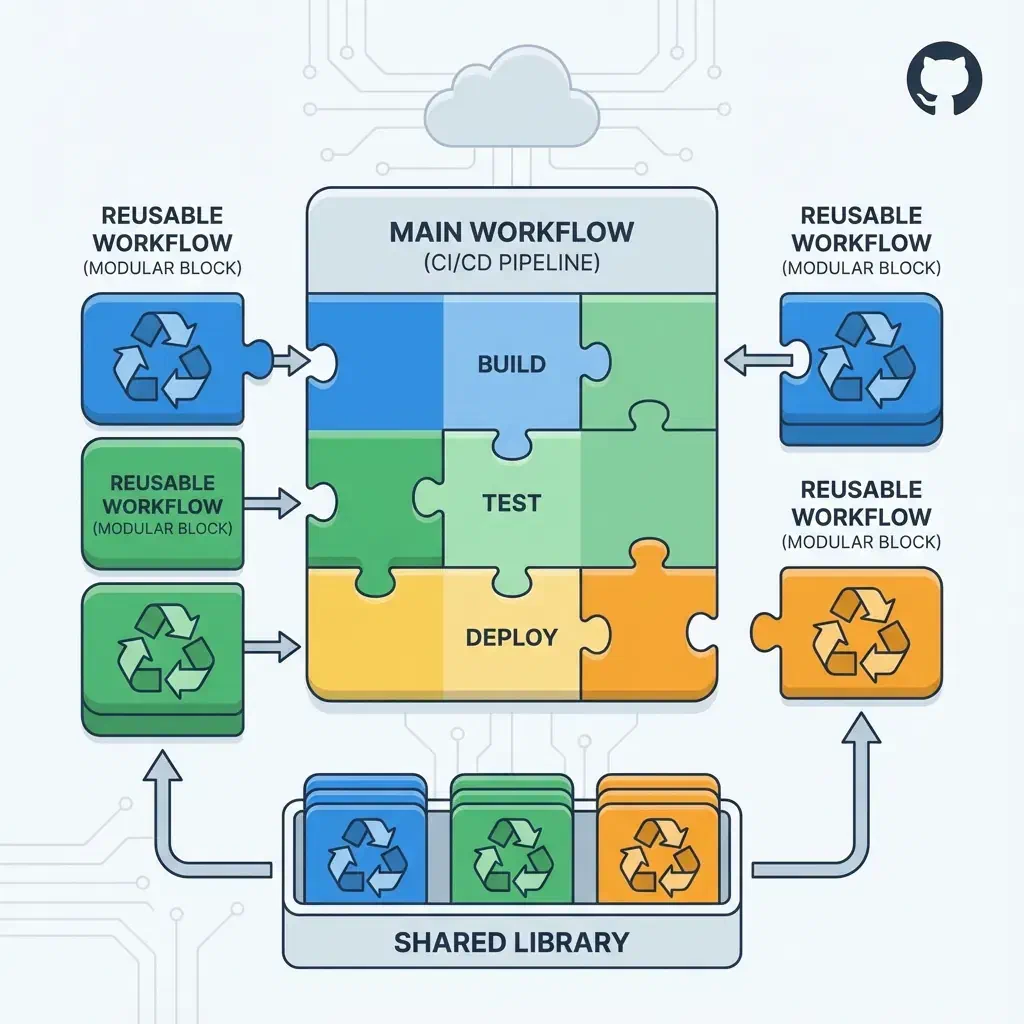
If you work with CI/CD on GitHub Actions, you’ve probably found yourself copying and pasting the same YAML code between different workflows. What if I told you there’s a much more elegant and professional way to do this? In this post, I’ll show you how Reusable Workflows can revolutionize your CI/CD pipeline.
The Problem: Copy-Paste Hell
Imagine this familiar situation:
You have 10 repositories, each with its own CI/CD workflow. All of them basically do the same thing:
- Build the application
- Run tests
- Static code analysis
- Deploy to staging/production
Now you need to update the Node.js version used in all workflows. What happens?
# repo-1/.github/workflows/ci.yml
- uses: actions/setup-node@v3
  with:
    node-version: '16'  # Need to change to '18'

# repo-2/.github/workflows/ci.yml
- uses: actions/setup-node@v3
  with:
    node-version: '16'  # Need to change here too

# repo-3/.github/workflows/ci.yml
- uses: actions/setup-node@v3
  with:
    node-version: '16'  # And here...

# ... 7 more repositories to update manually
You end up having to:
- Open 10 different pull requests
- Manually update each file
- Hope nobody makes mistakes in the process
- Deal with inconsistencies between repositories
This is not productive, not scalable, and definitely not enterprise-grade.
The Solution: Reusable Workflows
Reusable Workflows are GitHub Actions’ answer to the DRY (Don’t Repeat Yourself) principle in CI/CD. They allow you to:
- ✅ Centralize common logic in a single place
- ✅ Reuse workflows across multiple repositories
- ✅ Make changes once that propagate to all users
- ✅ Ensure consistency across all your projects
- ✅ Dramatically simplify maintenance
How Reusable Workflows Work
Basic Structure
A Reusable Workflow is simply a normal GitHub Actions workflow with a special trigger: workflow_call.
# .github/workflows/reusable-build.yml
name: Reusable Build Workflow

on:
  workflow_call:
    inputs:
      node-version:
        description: 'Node.js version to use'
        required: false
        default: '18'
        type: string
    secrets:
      DEPLOY_TOKEN:
        description: 'Token for deployment'
        required: true

jobs:
  build:
    runs-on: ubuntu-latest
    steps:
      - uses: actions/checkout@v4

      - name: Setup Node.js
        uses: actions/setup-node@v4
        with:
          node-version: ${{ inputs.node-version }}

      - name: Install dependencies
        run: npm ci

      - name: Run tests
        run: npm test

      - name: Build
        run: npm run build
Using the Reusable Workflow
Now, in any repository, you can simply call this workflow:
# another-repo/.github/workflows/ci.yml
name: CI Pipeline

on:
  push:
    branches: [main]
  pull_request:
    branches: [main]

jobs:
  build:
    uses: my-org/workflows/.github/workflows/reusable-build.yml@main
    with:
      node-version: '18'
    secrets:
      DEPLOY_TOKEN: ${{ secrets.DEPLOY_TOKEN }}
Done! Just 3 lines and you have the entire pipeline working.
Advanced Features of Reusable Workflows
1. Typed Inputs
Reusable Workflows support different input types:
on:
  workflow_call:
    inputs:
      environment:
        type: string
        required: true

      enable-cache:
        type: boolean
        default: true

      max-parallel-jobs:
        type: number
        default: 4
This ensures type-safety and automatic parameter validation.
2. Outputs
Reusable workflows can return values to their callers:
on:
  workflow_call:
    outputs:
      build-version:
        description: "Version of the built artifact"
        value: ${{ jobs.build.outputs.version }}

jobs:
  build:
    runs-on: ubuntu-latest
    outputs:
      version: ${{ steps.get-version.outputs.version }}
    steps:
      - id: get-version
        run: echo "version=$(cat package.json | jq -r .version)" >> $GITHUB_OUTPUT
Then you can use this output:
jobs:
  build:
    uses: ./.github/workflows/reusable-build.yml

  deploy:
    needs: build
    runs-on: ubuntu-latest
    steps:
      - name: Deploy version ${{ needs.build.outputs.build-version }}
        run: echo "Deploying ${{ needs.build.outputs.build-version }}"
3. Secrets Management
Secrets can be passed securely:
jobs:
  production-deploy:
    uses: ./.github/workflows/deploy.yml
    secrets:
      AWS_ACCESS_KEY_ID: ${{ secrets.AWS_ACCESS_KEY_ID }}
      AWS_SECRET_ACCESS_KEY: ${{ secrets.AWS_SECRET_ACCESS_KEY }}
Or, if you want to pass all secrets automatically:
jobs:
  deploy:
    uses: ./.github/workflows/deploy.yml
    secrets: inherit  # Passes all secrets from caller
Patterns and Best Practices
1. Workflow Versioning
Always use specific tags or branches when calling reusable workflows:
# ✅ Good - uses specific tag
uses: my-org/workflows/.github/workflows/ci.yml@v1.2.0

# ✅ Good - uses specific branch
uses: my-org/workflows/.github/workflows/ci.yml@main

# ❌ Avoid - specific SHA is hard to manage
uses: my-org/workflows/.github/workflows/ci.yml@a1b2c3d4
2. Centralized Repository
Create a dedicated repository for your reusable workflows:
my-org/github-workflows/
├── .github/
│   └── workflows/
│       ├── build-node.yml
│       ├── build-python.yml
│       ├── build-go.yml
│       ├── deploy-aws.yml
│       ├── deploy-gcp.yml
│       └── security-scan.yml
└── README.md
3. Clear Documentation
Document each reusable workflow:
name: Node.js Build Workflow

# Description: Complete pipeline for Node.js applications
#
# Inputs:
#   - node-version: Node.js version (default: '18')
#   - run-tests: Run tests (default: true)
#   - run-lint: Run linter (default: true)
#
# Required secrets:
#   - NPM_TOKEN: Token for private registry (optional)
#
# Outputs:
#   - artifact-name: Name of generated artifact
#   - test-results: Test status

on:
  workflow_call:
    # ...
4. Appropriate Granularity
Create workflows with well-defined responsibilities:
# ✅ Good - specific workflows
- build-and-test.yml
- security-scan.yml
- deploy-to-aws.yml

# ❌ Avoid - monolithic workflow
- do-everything.yml
Real-World Use Cases
1. Consistent Multi-Repo Pipeline
# Template for all microservices
jobs:
  ci:
    uses: company/workflows/.github/workflows/microservice-ci.yml@v2
    with:
      language: 'node'
      test-framework: 'jest'
    secrets: inherit
All 50 microservices use the same pipeline. One update -> 50 repos updated.
2. Standardized Deploy Environments
jobs:
  deploy-staging:
    uses: company/workflows/.github/workflows/deploy-k8s.yml@v1
    with:
      environment: 'staging'
      namespace: 'my-app-staging'
    secrets: inherit

  deploy-production:
    needs: deploy-staging
    uses: company/workflows/.github/workflows/deploy-k8s.yml@v1
    with:
      environment: 'production'
      namespace: 'my-app-prod'
    secrets: inherit
3. Centralized Security Scanning
jobs:
  security:
    uses: security-team/workflows/.github/workflows/security-scan.yml@main
    with:
      scan-type: 'full'
      fail-on: 'high'
The security team maintains the workflow. All teams benefit from updates.
Comparison: Before vs After
Before (without Reusable Workflows)
# 150 lines of duplicated YAML in each repo
name: CI
on: [push]
jobs:
  test:
    runs-on: ubuntu-latest
    steps:
      - uses: actions/checkout@v4
      - uses: actions/setup-node@v4
        with:
          node-version: '18'
      - run: npm ci
      - run: npm test
      # ... 30 more lines

  build:
    runs-on: ubuntu-latest
    # ... 40 more lines

  security:
    # ... 30 more lines

  deploy:
    # ... 50 more lines
Problems:
- 150 lines × 20 repos = 3000 lines of duplicated code
- Simple change requires 20 PRs
- Inconsistencies between repos
- Hard to maintain standards
After (with Reusable Workflows)
# 10 lines in each repo
name: CI
on: [push]

jobs:
  pipeline:
    uses: company/workflows/.github/workflows/standard-pipeline.yml@v2
    with:
      app-name: 'my-app'
      environment: 'production'
    secrets: inherit
Benefits:
- 10 lines × 20 repos = 200 lines total
- One change -> all repos updated instantly
- Consistency guaranteed
- Easy maintenance and evolution
Matrix of Combined Workflows
You can create composite workflows by calling multiple reusable workflows:
jobs:
  lint:
    uses: ./.github/workflows/lint.yml

  test:
    uses: ./.github/workflows/test.yml
    needs: lint

  build:
    uses: ./.github/workflows/build.yml
    needs: test

  security-scan:
    uses: ./.github/workflows/security.yml
    needs: build

  deploy-staging:
    uses: ./.github/workflows/deploy.yml
    needs: [build, security-scan]
    with:
      environment: 'staging'

  integration-tests:
    uses: ./.github/workflows/integration-tests.yml
    needs: deploy-staging

  deploy-production:
    uses: ./.github/workflows/deploy.yml
    needs: integration-tests
    with:
      environment: 'production'
Each step is an independent reusable workflow, allowing flexible composition.
Monitoring and Observability
Reusable Workflows appear as expanded jobs in the GitHub Actions UI, allowing you to:
- See exactly which workflow version was executed
- Track where the workflow was called from
- Debug with clarity the source of problems
- Have complete execution visibility
Limitations and Considerations
Current Limitations
Depth Limit: Reusable workflows can call other reusable workflows, but only up to 4 levels deep.
Environment Variables: Environment variables are not automatically propagated (use explicit inputs).
Limited Contexts: Some contexts like
github.tokenmay behave differently in reusable workflows.
Workarounds
For environment variables:
# Caller workflow
env:
  GLOBAL_VAR: 'value'

jobs:
  call-workflow:
    uses: ./.github/workflows/reusable.yml
    with:
      env-var: ${{ env.GLOBAL_VAR }}  # Pass explicitly
Conclusion: Elevate Your CI/CD to the Next Level
Reusable Workflows are one of GitHub Actions’ most powerful features, yet still underutilized. By adopting them, you:
- Drastically reduce duplicated code
- Accelerate implementation time for changes
- Ensure consistency across all projects
- Simplify maintenance of complex pipelines
- Scale to hundreds of repositories without overhead
Migration Checklist
- Identify common patterns in your current workflows
- Create a centralized repository for reusable workflows
- Start with a simple workflow (e.g., linting)
- Gradually migrate more complex workflows
- Establish versioning and documentation
- Train the team on new patterns
- Monitor and adjust as needed
Next Steps
In the next post/video, I’ll show:
- How to create a complete library of reusable workflows
- Ready-to-use templates for different technologies (Node.js, Python, Go, Docker)
- Versioning strategies for workflows
- Automated testing for workflows (yes, it’s possible!)
Useful Resources
Already using Reusable Workflows? Share in the comments how you use them! Have questions about implementation? Leave your question below!
#GitHubActions #CICD #DevOps #Automation #BestPractices
kubectl get related
| NAME | READY | STATUS | AGE |
|---|---|---|---|
 github-actions-matrix-strategy GitHub Actions Matrix Strategy: Testing Multiple Versions Simultaneously | 1/1 | Available | 425d |
 github-template-repositories Simplify Your Projects: How to Use GitHub Template Repositories | 1/1 | Available | 339d |
 nginx-vs-traefik-vs-caddy Nginx vs Traefik vs Caddy: Which Reverse Proxy to Choose? | 1/1 | Available | 331d |
kubectl get events